2
OMR60
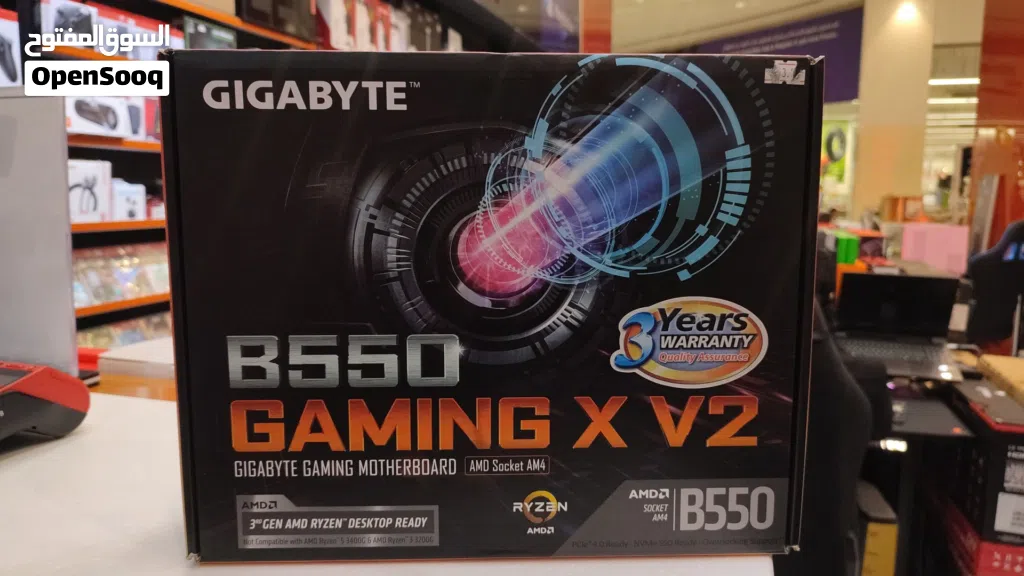
مدر بود جيونج b550
- NeighborhoodAmerat
- CityMuscat
- Sub CategoryMotherboards
- CategoryComputers & Laptops
- Listing Id282246848
- Published Date07-06-2026
Description
While both of these are highly popular AMD AM4 motherboards from Gigabyte using the B550 chipset, the biggest difference comes down to physical size (**Form Factor**) and **Power Delivery (VRMs)**.
The **Gaming X V2** is a step up in quality and size, while the **B550M DS3H** is a budget-focused, compact board.
Here is the breakdown of the major differences:
### 1. Size (Form Factor)
* **B550M DS3H:** This is a **Micro-ATX (mATX)** board. It is smaller, meaning it will fit into compact cases as well as standard tower cases.
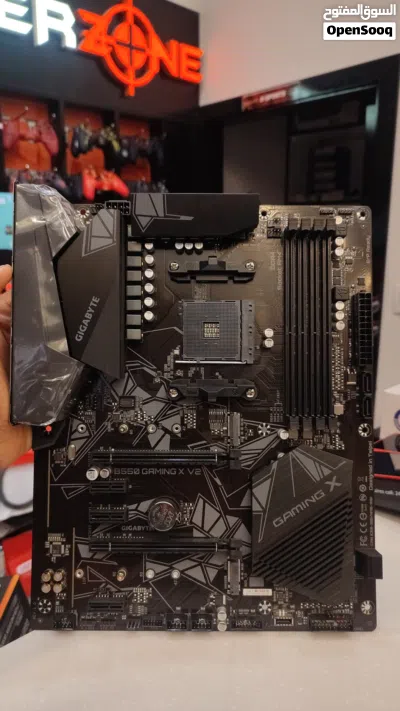
* **B550 Gaming X V2:** This is a full-sized **ATX** board. It requires a standard mid-tower or full-tower case and won't physically fit into smaller Micro-ATX cases.
### 2. Power Delivery & Heatsinks (VRM)
This is the most important factor if you are choosing a processor.
* **B550M DS3H:** Uses a basic **5+3 phase** VRM with small heatsinks. It is perfectly fine for mid-range chips like the Ryzen 5 5600 or Ryzen 7 5700X, but it will get quite hot if you try to pair it with a heavy power-guzzler like the Ryzen 9 5900X.
* **B550 Gaming X V2:** Features a much better **10+3 phase** digital power design and much larger, chunkier heatsinks. It can comfortably handle high-end processors (like the Ryzen 7 5800X3D or Ryzen 9 series) without overheating.
### 3. Ports and Connectivity
* **Front Panel USB-C:** The Gaming X V2 has an internal header for a **Front Panel USB Type-C** port (if your PC case has one). The DS3H completely lacks this.
* **Rear USB Ports:** The Gaming X V2 gives you a dedicated fast **USB 3.2 Gen 2 (10Gbps) port** on the back. The DS3H only has standard USB 3.2 Gen 1 (5Gbps) and USB 2.0 ports.
* **PCIe Slots:** Because the Gaming X V2 is larger, it offers more expansion slots (an extra long PCIe slot running at x2 speeds and 3 smaller PCIe x1 slots vs. the DS3H's single x1 slot).
### Summary Table
Feature Gigabyte B550M DS3H Gigabyte B550 Gaming X V2
---------
**Size** Micro-ATX (Compact) ATX (Full Size)
**VRM Power Phases** 5+3 Phases (Basic) 10+3 Phases (Stronger)
**VRM Cooling** Small heatsink Large surface-area heatsinks
**Front USB-C Header** No **Yes**
**Fast Rear USB (10Gbps)** No **Yes (1 Port)**
**I/O Shield** Loose piece in box **Pre-installed** (Cleaner look)
### Which one should you choose?
* **Buy the B550M DS3H** if you are on a tight budget, using a smaller Micro-ATX case, and pairing it with a 65W processor like the Ryzen 5 3600, 5600, or 5600X.
* **Buy the B550 Gaming X V2** if you have a standard mid-tower case, want better power handling for future upgrades (like a 5800X3D for gaming), or specifically want that front-panel USB-C port.
The **Gaming X V2** is a step up in quality and size, while the **B550M DS3H** is a budget-focused, compact board.
Here is the breakdown of the major differences:
### 1. Size (Form Factor)
* **B550M DS3H:** This is a **Micro-ATX (mATX)** board. It is smaller, meaning it will fit into compact cases as well as standard tower cases.
* **B550 Gaming X V2:** This is a full-sized **ATX** board. It requires a standard mid-tower or full-tower case and won't physically fit into smaller Micro-ATX cases.
### 2. Power Delivery & Heatsinks (VRM)
This is the most important factor if you are choosing a processor.
* **B550M DS3H:** Uses a basic **5+3 phase** VRM with small heatsinks. It is perfectly fine for mid-range chips like the Ryzen 5 5600 or Ryzen 7 5700X, but it will get quite hot if you try to pair it with a heavy power-guzzler like the Ryzen 9 5900X.
* **B550 Gaming X V2:** Features a much better **10+3 phase** digital power design and much larger, chunkier heatsinks. It can comfortably handle high-end processors (like the Ryzen 7 5800X3D or Ryzen 9 series) without overheating.
### 3. Ports and Connectivity
* **Front Panel USB-C:** The Gaming X V2 has an internal header for a **Front Panel USB Type-C** port (if your PC case has one). The DS3H completely lacks this.
* **Rear USB Ports:** The Gaming X V2 gives you a dedicated fast **USB 3.2 Gen 2 (10Gbps) port** on the back. The DS3H only has standard USB 3.2 Gen 1 (5Gbps) and USB 2.0 ports.
* **PCIe Slots:** Because the Gaming X V2 is larger, it offers more expansion slots (an extra long PCIe slot running at x2 speeds and 3 smaller PCIe x1 slots vs. the DS3H's single x1 slot).
### Summary Table
Feature Gigabyte B550M DS3H Gigabyte B550 Gaming X V2
---------
**Size** Micro-ATX (Compact) ATX (Full Size)
**VRM Power Phases** 5+3 Phases (Basic) 10+3 Phases (Stronger)
**VRM Cooling** Small heatsink Large surface-area heatsinks
**Front USB-C Header** No **Yes**
**Fast Rear USB (10Gbps)** No **Yes (1 Port)**
**I/O Shield** Loose piece in box **Pre-installed** (Cleaner look)
### Which one should you choose?
* **Buy the B550M DS3H** if you are on a tight budget, using a smaller Micro-ATX case, and pairing it with a 65W processor like the Ryzen 5 3600, 5600, or 5600X.
* **Buy the B550 Gaming X V2** if you have a standard mid-tower case, want better power handling for future upgrades (like a 5800X3D for gaming), or specifically want that front-panel USB-C port.
AI Tags

Frequently Asked Questions
How many listings are there in Motherboards?
What's the safest method to contact advertisers?
How can I arrange a safe meeting and verify the product quality?

......Reply to chat within 21 hour
3.3
01-01-2022
General Tips
- Only meet in public places
- Never pay or transfer money in advance
- Inspect the product before you buy it
Sell Anything on OpenSooq
Do you have a similar Listing?
Add New Listing

Want more views?
Promote or Repost your listing
Explore More