2
OMR60
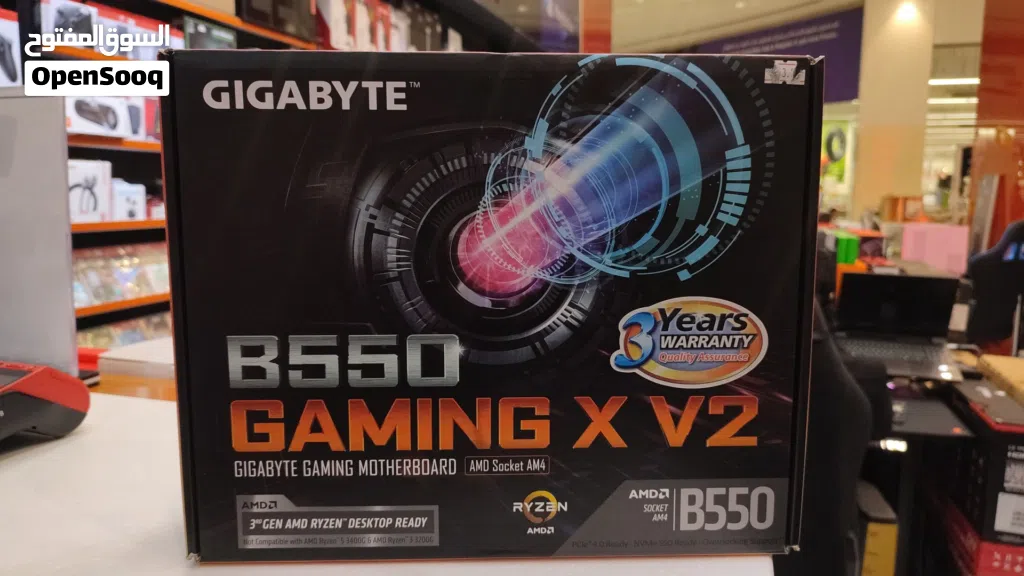
مدر بود جيونج b550
الوصف
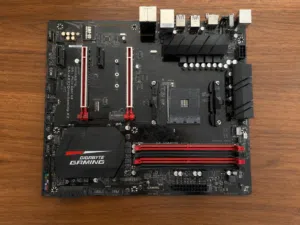
While both of these are highly popular AMD AM4 motherboards from Gigabyte using the B550 chipset, the biggest difference comes down to physical size (**Form Factor**) and **Power Delivery (VRMs)**.
The **Gaming X V2** is a step up in quality and size, while the **B550M DS3H** is a budget-focused, compact board.
Here is the breakdown of the major differences:
### 1. Size (Form Factor)
* **B550M DS3H:** This is a **Micro-ATX (mATX)** board. It is smaller, meaning it will fit into compact cases as well as standard tower cases.
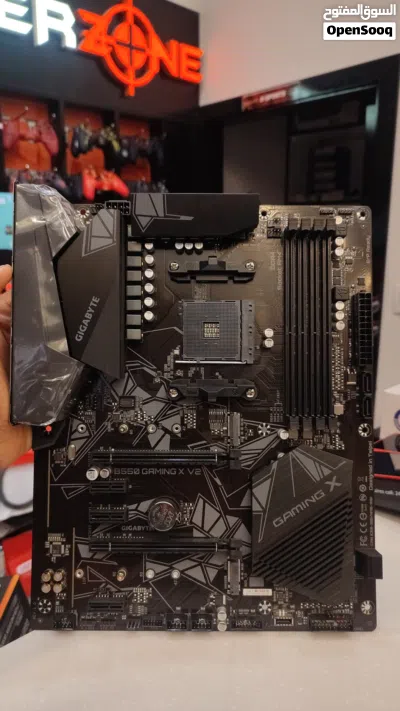
* **B550 Gaming X V2:** This is a full-sized **ATX** board. It requires a standard mid-tower or full-tower case and won't physically fit into smaller Micro-ATX cases.
### 2. Power Delivery & Heatsinks (VRM)
This is the most important factor if you are choosing a processor.
* **B550M DS3H:** Uses a basic **5+3 phase** VRM with small heatsinks. It is perfectly fine for mid-range chips like the Ryzen 5 5600 or Ryzen 7 5700X, but it will get quite hot if you try to pair it with a heavy power-guzzler like the Ryzen 9 5900X.
* **B550 Gaming X V2:** Features a much better **10+3 phase** digital power design and much larger, chunkier heatsinks. It can comfortably handle high-end processors (like the Ryzen 7 5800X3D or Ryzen 9 series) without overheating.
### 3. Ports and Connectivity
* **Front Panel USB-C:** The Gaming X V2 has an internal header for a **Front Panel USB Type-C** port (if your PC case has one). The DS3H completely lacks this.
* **Rear USB Ports:** The Gaming X V2 gives you a dedicated fast **USB 3.2 Gen 2 (10Gbps) port** on the back. The DS3H only has standard USB 3.2 Gen 1 (5Gbps) and USB 2.0 ports.
* **PCIe Slots:** Because the Gaming X V2 is larger, it offers more expansion slots (an extra long PCIe slot running at x2 speeds and 3 smaller PCIe x1 slots vs. the DS3H's single x1 slot).
### Summary Table
Feature Gigabyte B550M DS3H Gigabyte B550 Gaming X V2
---------
**Size** Micro-ATX (Compact) ATX (Full Size)
**VRM Power Phases** 5+3 Phases (Basic) 10+3 Phases (Stronger)
**VRM Cooling** Small heatsink Large surface-area heatsinks
**Front USB-C Header** No **Yes**
**Fast Rear USB (10Gbps)** No **Yes (1 Port)**
**I/O Shield** Loose piece in box **Pre-installed** (Cleaner look)
### Which one should you choose?
* **Buy the B550M DS3H** if you are on a tight budget, using a smaller Micro-ATX case, and pairing it with a 65W processor like the Ryzen 5 3600, 5600, or 5600X.
* **Buy the B550 Gaming X V2** if you have a standard mid-tower case, want better power handling for future upgrades (like a 5800X3D for gaming), or specifically want that front-panel USB-C port.
The **Gaming X V2** is a step up in quality and size, while the **B550M DS3H** is a budget-focused, compact board.
Here is the breakdown of the major differences:
### 1. Size (Form Factor)
* **B550M DS3H:** This is a **Micro-ATX (mATX)** board. It is smaller, meaning it will fit into compact cases as well as standard tower cases.
* **B550 Gaming X V2:** This is a full-sized **ATX** board. It requires a standard mid-tower or full-tower case and won't physically fit into smaller Micro-ATX cases.
### 2. Power Delivery & Heatsinks (VRM)
This is the most important factor if you are choosing a processor.
* **B550M DS3H:** Uses a basic **5+3 phase** VRM with small heatsinks. It is perfectly fine for mid-range chips like the Ryzen 5 5600 or Ryzen 7 5700X, but it will get quite hot if you try to pair it with a heavy power-guzzler like the Ryzen 9 5900X.
* **B550 Gaming X V2:** Features a much better **10+3 phase** digital power design and much larger, chunkier heatsinks. It can comfortably handle high-end processors (like the Ryzen 7 5800X3D or Ryzen 9 series) without overheating.
### 3. Ports and Connectivity
* **Front Panel USB-C:** The Gaming X V2 has an internal header for a **Front Panel USB Type-C** port (if your PC case has one). The DS3H completely lacks this.
* **Rear USB Ports:** The Gaming X V2 gives you a dedicated fast **USB 3.2 Gen 2 (10Gbps) port** on the back. The DS3H only has standard USB 3.2 Gen 1 (5Gbps) and USB 2.0 ports.
* **PCIe Slots:** Because the Gaming X V2 is larger, it offers more expansion slots (an extra long PCIe slot running at x2 speeds and 3 smaller PCIe x1 slots vs. the DS3H's single x1 slot).
### Summary Table
Feature Gigabyte B550M DS3H Gigabyte B550 Gaming X V2
---------
**Size** Micro-ATX (Compact) ATX (Full Size)
**VRM Power Phases** 5+3 Phases (Basic) 10+3 Phases (Stronger)
**VRM Cooling** Small heatsink Large surface-area heatsinks
**Front USB-C Header** No **Yes**
**Fast Rear USB (10Gbps)** No **Yes (1 Port)**
**I/O Shield** Loose piece in box **Pre-installed** (Cleaner look)
### Which one should you choose?
* **Buy the B550M DS3H** if you are on a tight budget, using a smaller Micro-ATX case, and pairing it with a 65W processor like the Ryzen 5 3600, 5600, or 5600X.
* **Buy the B550 Gaming X V2** if you have a standard mid-tower case, want better power handling for future upgrades (like a 5800X3D for gaming), or specifically want that front-panel USB-C port.
علامات الذكاء الاصطناعي

الأسئلة الشائعة
ما هو عدد الإعلانات في لوحات أم على السوق المفتوح؟
كيف يمكنني التواصل مع المُعلن بأمان؟
ما أفضل طريقة للقاء المُعلن والتأكد من جودة المنتج؟

......الردّ على الدردشة خلال 21 ساعة
3.3
01-01-2022
نصائح عامة
- اجتمع في الأماكن العامة فقط
- لا تقم بإرسال المال مسبقاً
- قم بتفقّد المنتج جيداً قبل شرائه
بيع كل شئ على السوق المفتوح
هل تود اضافة اعلان مماثل ؟
أضف إعلانك الآن

تريد مشاهدات أكثر؟
ميز وأعد نشر إعلانك
مشاهدة المزيد